Integrating Ryviu into the Lantern - Product Quiz Builder app allows you to display trusted reviews on the quiz results page seamlessly. This feature enhances social proof, effectively persuading hesitant shoppers and bolstering customer trust.
Lantern ‑ Product Quiz Builder was built by App Attic from 2021 to transform your online shopping journey with quick manual or AI-generated quizzes. In just moments, guide customers through tailored questions to understand their preferences, leveraging dynamic data for improved conversions. Recommend products based on their responses, removing guesswork and elevating personalization. Evolve your store from a standard search platform to a tailored, interactive experience, reintroducing the human touch to product discovery.
Here are some outstanding features at Lantern ‑ Product Quiz Builder:
Create AI-crafted quizzes in seconds.
Boost conversions and cut returns with tailor-made suggestions.
Leverage dynamic data in questions for higher completion rates and conversions.
Enjoy full flexibility by publishing your quiz as a standalone page, embed, or popup.
Ensure that you have the following requirements in place:
Install Ryviu app
Install Lantern ‑ Product Quiz Builder
There are 3 steps that you need to follow:
1. Import reviews for your products in your Ryviu account.
2. Create the quiz in your Lantern dashboard.
3. Select Ryviu app in your Lantern dashboard.
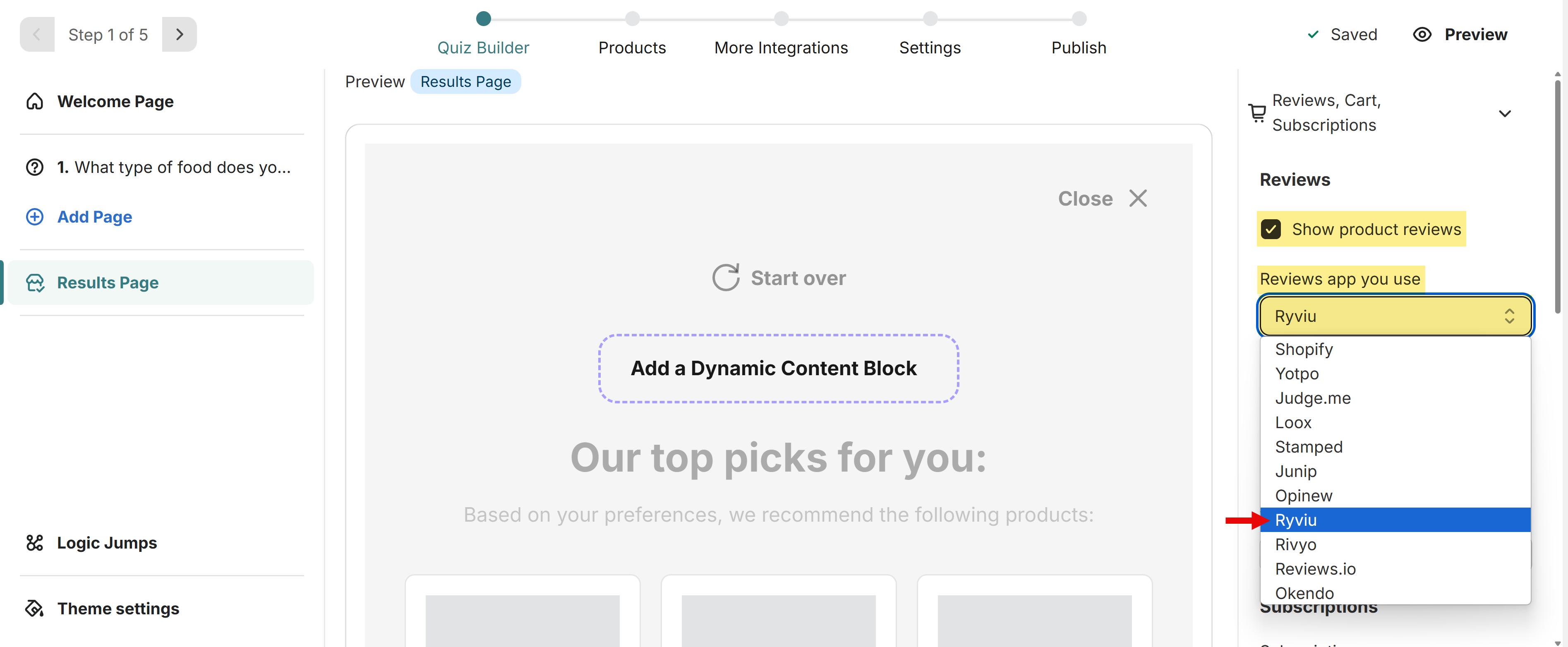
Edit the quiz and go over to the Results Page.
From the right-hand side menu, select the Reviews, Cart, Subscriptions drop-down.
Enable the Show product reviews option.
From the Reviews app click drop-down menu to select Ryviu.
Need help?
Get in touch with our support team through live chat or email at [email protected]. We're here to help!