Adding Google Rich Snippets helps your product pages display star ratings directly in Google search results, boosting your credibility and driving more organic traffic to your store.

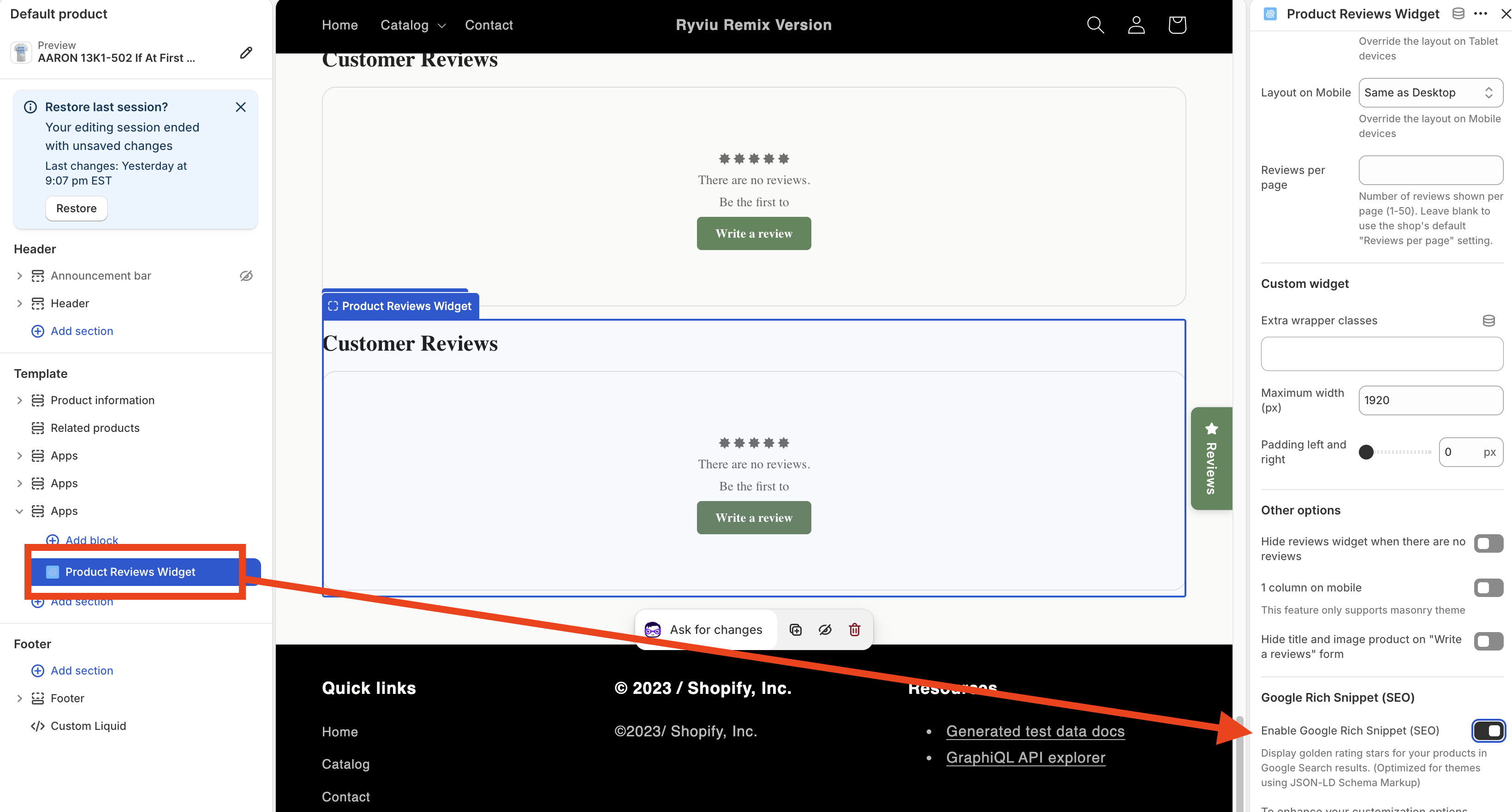
If your store uses a standard Shopify 2.0 theme, you can enable this feature directly in your theme customizer without editing any code:
From your Shopify admin, go to Sales channels > Online Store > Themes.
Click Customize on your current theme.
Navigate to the Product template page.
Select Ryviu’s Product Review Widget.
Check the box for Enable Google Rich Snippet (SEO) in the settings panel.
Click Save to apply changes.
If your store uses an older vintage theme, please follow these manual steps:
From your Shopify admin, go to Sales channels > Online Store.
On your current theme, click the three dots ... > Select Edit Code.
In the Sections folder, open the main-product.liquid file.
Find this line of code in the above tag. <script type="application/ld+json">
Find this line of code inside that tag: "name" : {{ product.title | json }},
Paste the following snippet right below that line:
{% assign ryviu = product.metafields.ryviu %}
{% if ryviu %}
  {%- assign aggregate_rating = ryviu.product_reviews_info | split: ";" -%}
  {%- assign r_avg = aggregate_rating[1] | plus: 0 -%}
  {%- assign r_count = aggregate_rating[0] | plus: 0 -%}
  {%- if r_count > 0 -%}
    "aggregateRating": {
      "@type": "AggregateRating",
      "ratingValue": {{ r_avg }},
      "reviewCount": {{ r_count }}
     },
  {%- endif -%}
{% endif %}
Click Save to save your file.
Go to the Rich Results Test.
Enter the URL of your product page to verify that the Rich Snippets are implemented correctly.
Need help?
Get in touch with our support team through live chat or email at [email protected]. We're here to help!